
Website sources · controls and screen
Consult each field, button and Fonts tab on the site, with screenshots of the system and explanation of its effects.
Reviewed October 23, 2026 · Customer guide
Navigation was checked and controls were checked against the panel code. Save, import, delete, and activate operations were not run on production data for this screenshot.
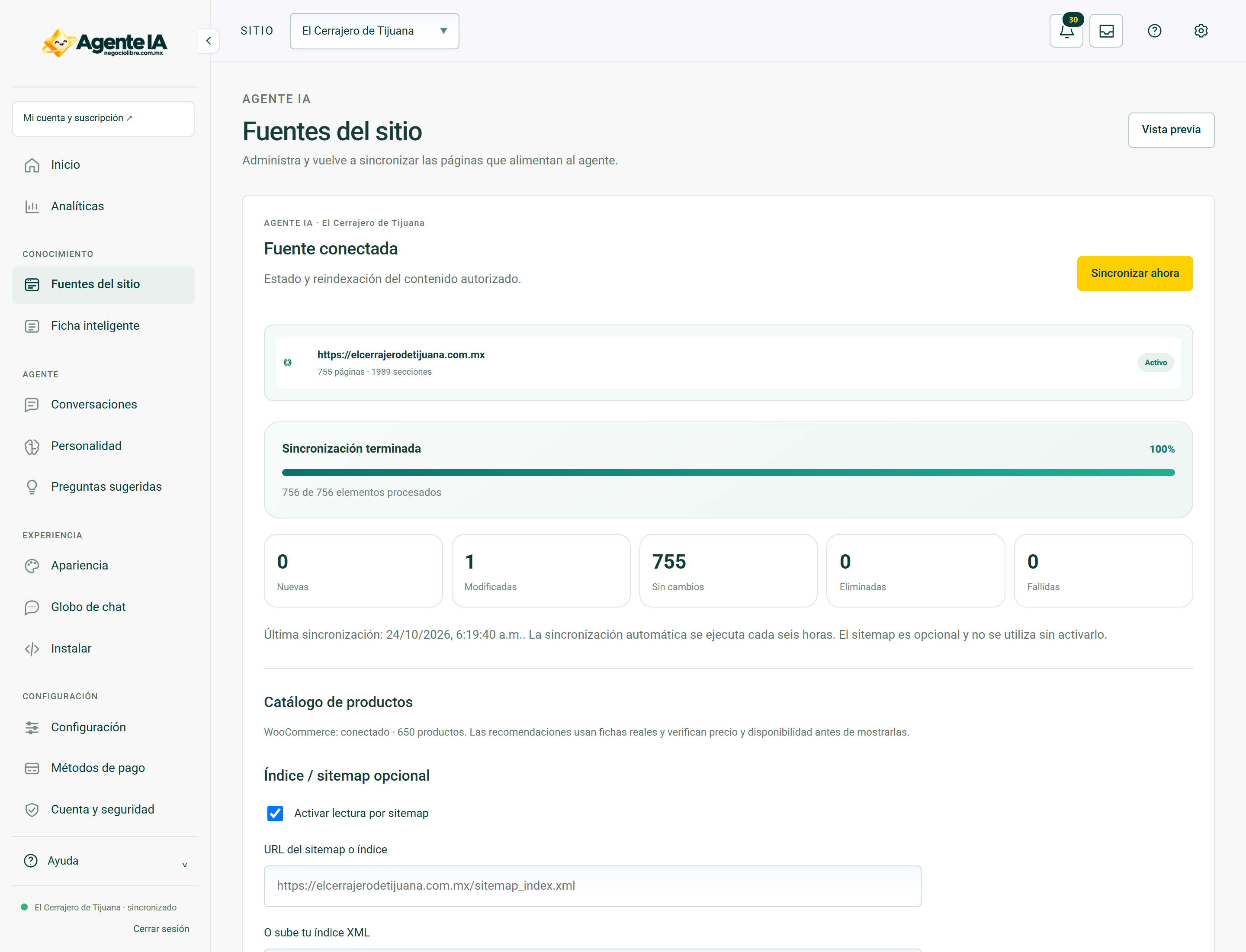
Control by control
| Control | How to use | Effect |
|---|---|---|
| 1SITIOselect | Change the store or active site. Check this selector before saving, importing, or syncing. | data entryLocated in the actual interface |
| 2Notifications: 18 unreadbutton | Opens account context notices and its unread counter. A historical warning does not confirm a current failure. | ReadingLocated in the actual interface |
| 3inboxbutton | Open the account’s messages and notifications inbox. | NavigationLocated in the actual interface |
| 4MY ACCOUNT ↗to | Open account, sites or subscription management; It is not the editor of the search engine. | NavigationLocated in the actual interface |
| 5Administration ↗to | Open global administration if your account has that permission. It should not be shared with a client without authorization. | Browsing with permissionLocated in the actual interface |
| 6Activate dark modebutton | Toggle the visual theme and retain the browser preference. It does not modify content or commercial data. | Local preferenceLocated in the actual interface |
| 7Previewbutton | Open the associated site to check the published experience. It does not confirm that unsaved changes are published. | NavigationLocated in the actual interface |
| 8Sync nowbutton | Start the indicated processing. You can update knowledge or derived data. Review site, progress, errors and completion before repeating. | Persistent processingLocated; not run in production |
| 9Activate reading by sitemapcheckbox | Allows you to read the configured sitemap or index. Review the domain before saving and syncing. | Selection; requires saving according to the formLocated in the actual interface |
| 10Sitemap or index URLurl | Public URL of the sitemap or authorized index of this business. | data entryLocated in the actual interface |
| 11Or upload your XML indexfiles | Loads an authoritative XML index; not a copy of private data or credentials. | data entryLocated in the actual interface |
| 12Save and syncbutton | Start the indicated processing. You can update knowledge or derived data. Review site, progress, errors and completion before repeating. | Persistent processingLocated; not run in production |
Steps
- Select the correct store or site in the header.
- Locate the control by its label in the capture and in the table.
- Check if its effect is read, local selection or persistent change before using it.
Before changing data
Check permissions and context. A snapshot documents the observed interface, it does not guarantee that all states, plans or integrations have the same controls. Hidden fields protect real data; They are not example information.
After using a control
In a save, review the confirmation and consult the data again. In a sync, it checks for completion and a sample of the result. Don’t interpret opening a form or copying code as a completed post.
How to verify it worked
The control produces the documented effect and preserves the correct context data and constraints.